Introduction
Expanding your business to global markets is more than offering competitive prices. It also means showing each region’s product information in the right language and format.
UnoPim, an open-source Product Information Management (PIM) system, helps businesses easily and efficiently manage product content across multiple locales.
In this blog, we’ll explain how UnoPim’s multi-locale management works, why it matters for your business, and how to set it up step by step.

Why Multi-Locale Management Is Important for Global Business
When targeting customers in different countries, it’s important to show product details in the customer’s language and local format for a smooth shopping experience.
Without proper locale management, companies face challenges such as:
- Time-consuming manual translations
- Inconsistent product information across markets
- Errors in displaying region-specific units, dates, and formats
- Difficulty maintaining clean, organized product data
UnoPim’s multi-locale system provides a centralized way to manage localized product content, helping businesses deliver accurate, consistent information to every market.
Key Features of UnoPim Multi-Locale Management
1. Create and Manage Multiple Locales
Easily define new locales using standardized codes such as:
- en_US for US English
- fr_FR for French (France)
- de_DE for German (Germany)
For each locale, you can specify:
- Language and region
- Display name (e.g., English (United States))
- Status (enabled or disabled)
2. Assign Locales to Sales Channels
UnoPim allows you to assign different locales to specific sales channels (e.g., eCommerce websites, marketplaces).
This ensures that the correct localized product information is displayed to customers in the right region.
3. Manage Localized Product Data
For each product, you can provide localized versions of:
- Product Name
- Product Description
- Attribute Values (e.g., specifications, dimensions)
All localized content is stored in a structured way, making updates easy and consistent.
4. Enable or Disable Locales
You can enable or disable specific locales at any time without deleting them.
This lets you manage active locales easily and keeps the system organized.
Step-by-Step: Setting Up Multi-Locale in UnoPim
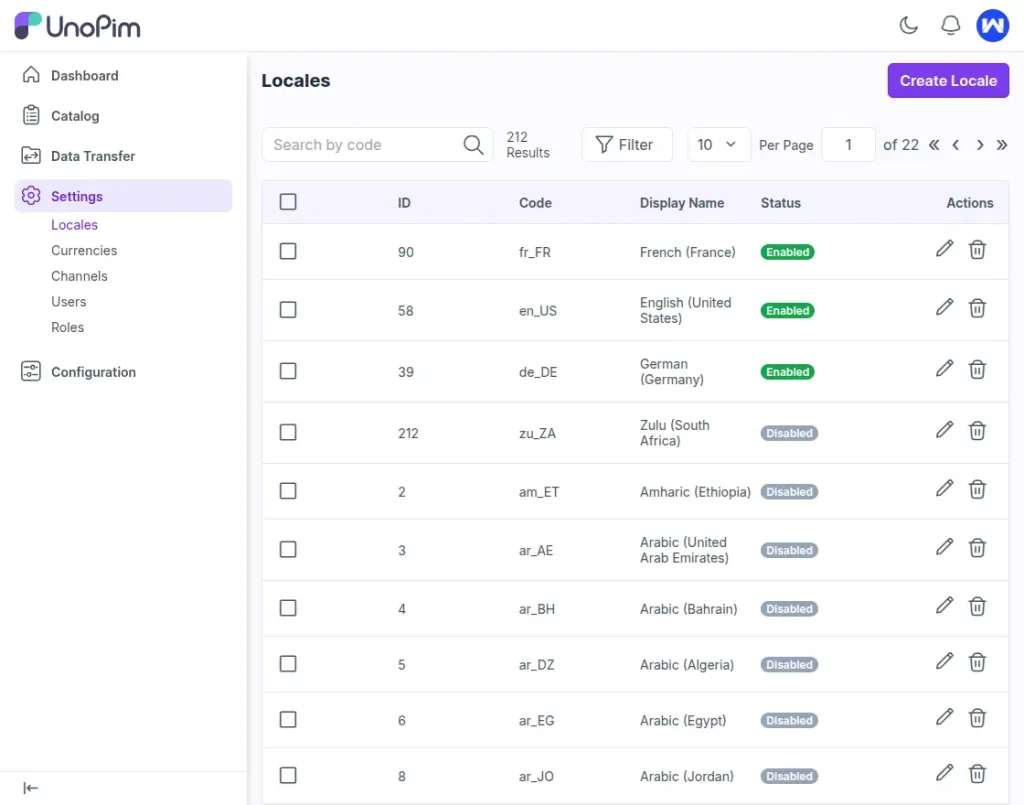
Step 1 – Access the Locale Settings
- Log in to your UnoPim dashboard.
- Navigate to Settings → Locales to see existing locales or add a new one.

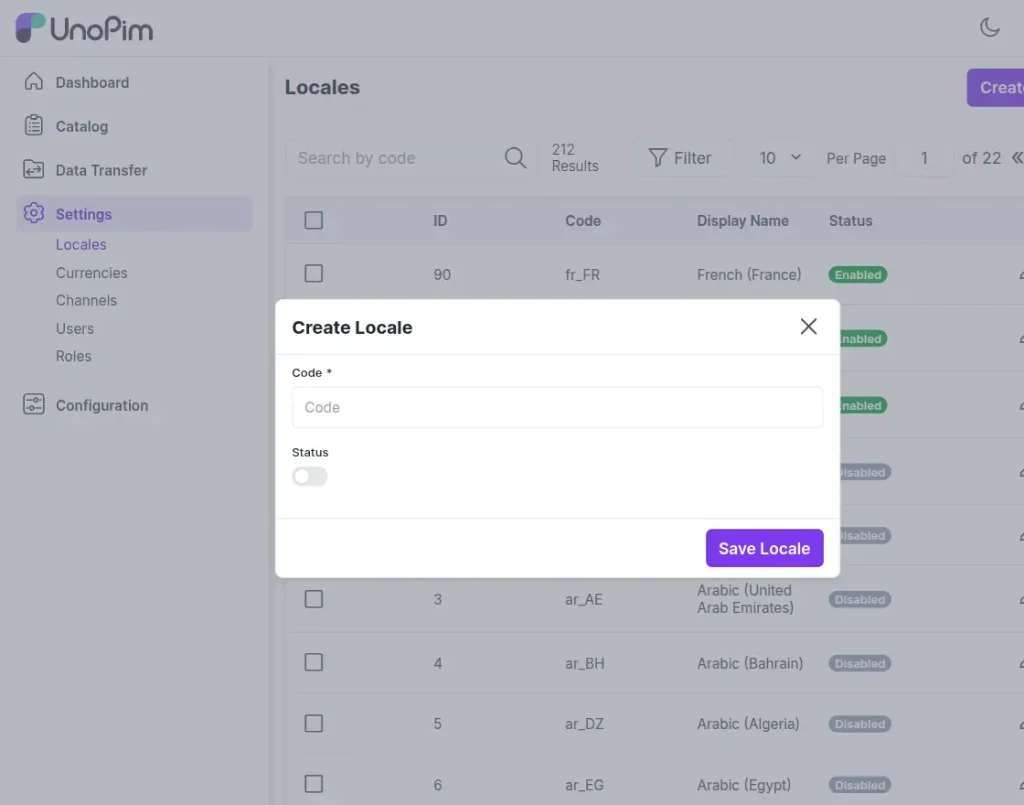
Step 2 – Add a New Locale
Provide the following details:
- Locale Code: Example – en_GB (English – UK), fr_FR (French – France)
- Display Name: Example – English (United Kingdom)
- Status: Set to Enabled to activate it.
- Click Save to register the locale.
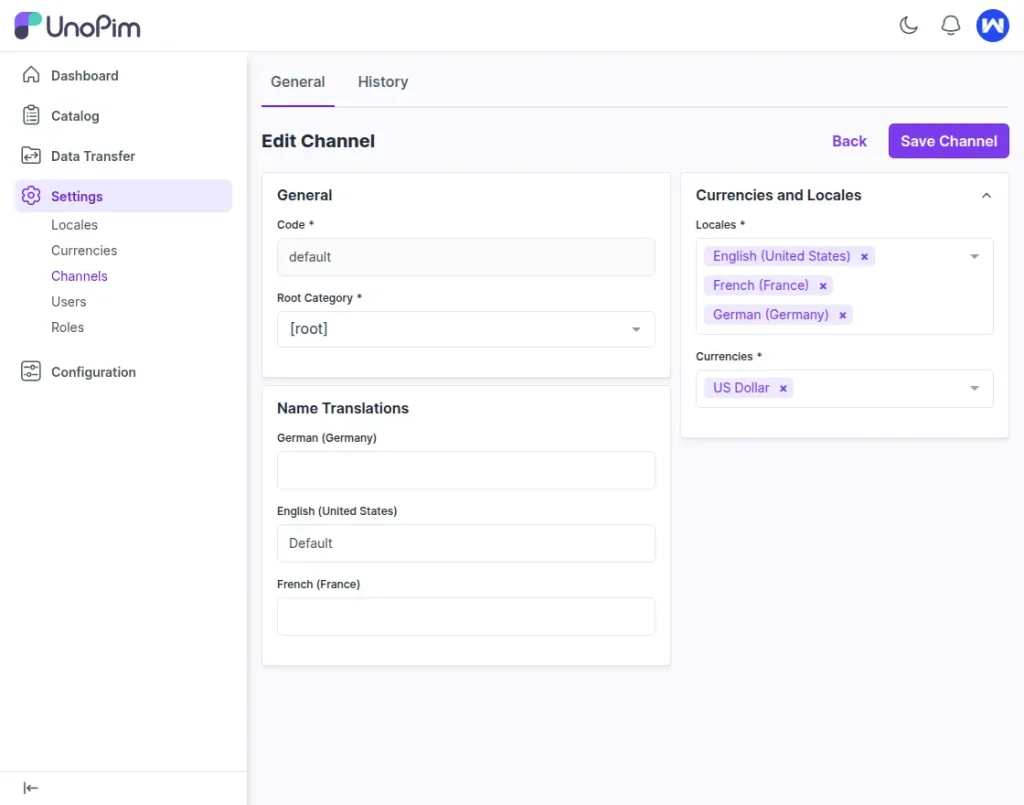
Step 3 – Link Locales to Channels
- Go to Settings → Channels.
- Select a channel (e.g., your online store).
- In the Locales section, choose one or more locales for that channel.
- Save the settings.
Step 4 – Add Localized Product Data
- Open the Products section.
- Select a product.
- Add localized information for product name, description, and attributes for each locale.
- Save the changes.
Why Choose UnoPim for Multi-Locale Management
- Simplified Localization Process: Manage all locales from one place.
- Value Per Locale for Attributes: Define different values for product attributes (like name or description) per locale to provide accurate localized content.
- Consistent Data Across Regions: Avoid duplication and inconsistencies.
- Faster Time to Market: Easily add new locales as your business grows.
- Developer-Friendly Platform: Easy for developers to customize according to your business needs.
Additional Resources
Learn more about setting up locales and managing them in the official UnoPim Documentation.
For detailed step-by-step instructions, visit the UnoPim blog: [How to Create Locale in UnoPim]
Conclusion
Managing localized product content for multiple regions doesn’t have to be complicated.
With UnoPim’s Multi-Locale Management system, you can:
- Easily add and configure new locales.
- Assign them to your sales channels.
- Manage product data in multiple languages and formats from a single interface.
Whether you’re expanding into your first international market or managing dozens of locales, UnoPim simplifies global growth by keeping your product content clean, consistent, and easy to manage.